Special Requirements

The Special Requirements and their parameters are described below.
Fiducial Point Override
(added using the Pass Plan form)
This requirement specifies an aperture for pointing (instead of the default aperture) for all exposure pointings in the Observation.
The target is placed at the fiducial point of the override aperture, but data are collected in all apertures regardless of this pointing change.
FIDUCIAL POINT OVERRIDE = WFI_01_FULL ... WFI_18_FULL , BORESIGHT , WFI_CEN , CGI_CEN
This requirement takes only one parameter (a selected Aperture Name), which is required. Users may select any aperture defined in the Science Instrument Aperture File (SIAF). The SIAF defines apertures and their fiducial points. See the Table for Apertures for Fiducial Point Override for a list of available apertures.
Table of Apertures for Fiducial Point Override
Aperture Names (from SIAF) | Description |
|---|---|
WFI_01_FULL through WFI_18_FULL | Detectors 1 through 18 on the WFI detector array may be selected individually |
BORESIGHT | Telescope boresight |
WFI_CEN | Default for WFI instrument |
CGI_CEN | Default for CGI instrument |
Offset
(added using the Pass Plan form)
OFFSET = OFFSET X OFFSET Y
This requirement specifies a non-default placement of the target, offset relative to the fiducial point of the aperture.
Enter OFFSET X and OFFSET Y in arcseconds. The target placement is moved from the fiducial point by the specified X and Y offset, along the X and Y axes of the ideal frame. For more information on ideal frame and fiducial point, see Coordinate Systems.
Figure showing OFFSET special requirement as shown by Aladin
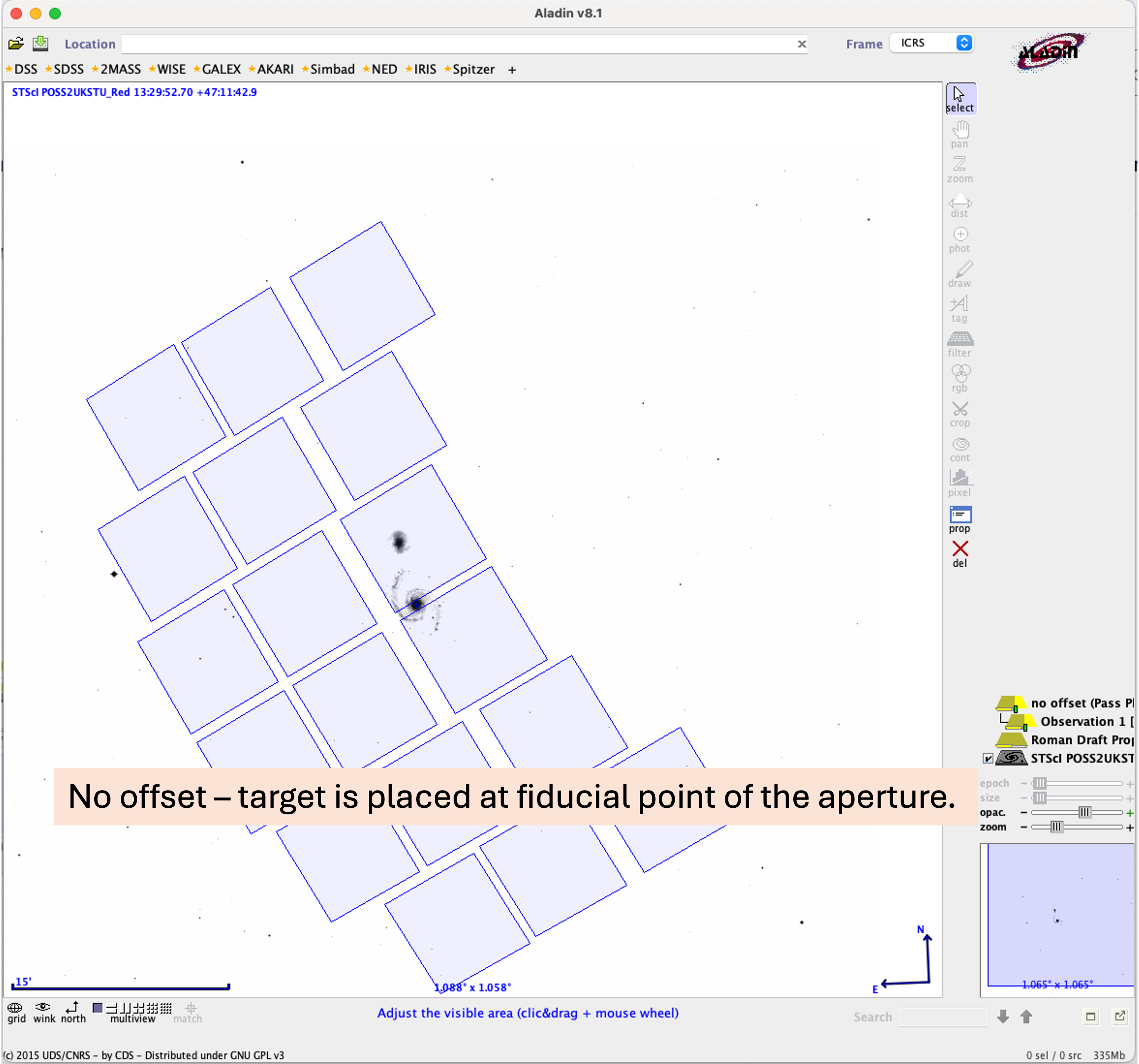
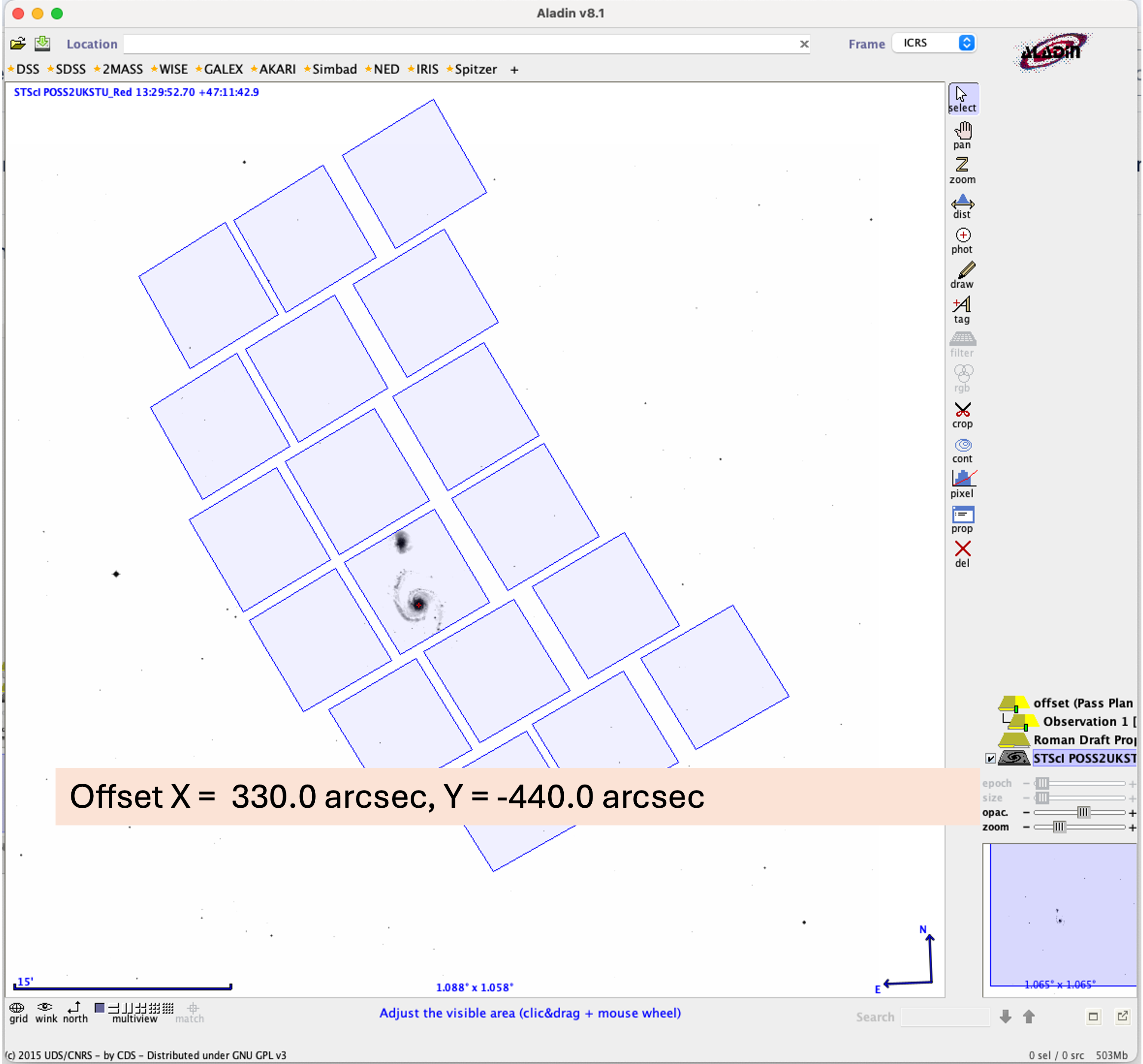
The first image shows default target placement at the fiducial point of the aperture with no offset. The second image shows the target placed at an offset of X = 330, Y = -440 from the fiducial point.
Settle Mode Exit Override
(added using the Pass Plan form)
SETTLE MODE EXIT OVERRIDE = COARSE FINE
When SETTLE MODE EXIT OVERRIDE is set to COARSE , there will be no Fine Guidance System (FGS) guiding for the Visits resulting from that Observation.
Non Interruptible Passes
(added using the Survey Plan form)
NON INTERRUPTIBLE PASSES
This requirement groups together the Segments of each individual Pass, and specifies that each Pass within a Survey Step must execute without interruption by other science programs. Interruptions are allowed between repeated Passes. This requirement has no parameters.
- When NON INTERRUPTIBLE PASSES is applied to a multi-Pass Survey Step (using a Repeat), the Passes are individually Non-Interruptible, not grouped together.
- NON INTERRUPTIBLE PASSES is not available for Survey Steps that include a Region Target.
- Note that even with NON INTERRUPTIBLE PASSES , interruptions by required non-science activities (such as calibrations, momentum unloads, or station keeping maneuvers) are still permitted anywhere within a Survey Step including within the Passes.
The Non-Interruptible Passes special requirement has no effect on Passes with only one Segment. Segments are already not interruptible.
V3 PA Range
(added using the Survey Plan form)
This requirement limits the spacecraft orientation to the specified range of position angles for each observation in a Survey Step. For more information about Roman orientation, see Coordinate Systems.
V3 PA RANGE is specified by MIN-ANGLE and MAX-ANGLE values.
Both MIN-ANGLE and MAX-ANGLE must each be between 0 and 360 degrees.
Each angle indicates a rotation of the spacecraft V3 axis on the sky measured in a counterclockwise direction (North through East) around the target. Note that if the V3 PA RANGE crosses zero, the MIN-ANGLE value would be greater than the MAX-ANGLE value. For example: V3 PA RANGE = 350 TO 10 degrees specifies a 20 degree range across zero. MIN-ANGLE should be less than MAX-ANGLE otherwise.
In general, a larger range increases opportunities for scheduling. If necessary, it is possible for MIN-ANGLE and MAX-ANGLE to be equal, thus restricting scheduling to a narrow time window when observations at that orientation are possible.
Multiple V3 PA RANGE requirements may be applied to the same Survey Step to allow multiple acceptable angle ranges. For example:
V3 PA RANGE = MIN-ANGLE 1 TO MAX-ANGLE 1
V3 PA RANGE = MIN-ANGLE 2 TO MAX-ANGLE 2
V3 PA RANGE = MIN-ANGLE 3 TO MAX-ANGLE 3
Multiple V3 PA Ranges on the same Survey Step may not overlap.
Note for many observations, two angle ranges can have a 180 degree offset and still be schedulable. If this is possible (for greater scheduling flexibility), please specify the additional possible angles. It is also possible for the position angle region to be larger than 180 degrees.
If a visit uses multiple targets, the direction of North from the first target will be used to interpret position angle range special requirements. The spacecraft will not roll between targets within a visit, so the position angle range at the subsequent targets may be slightly different from that of the first target.
Background Limited
(added using the Survey Plan form)
BACKGROUND LIMITED does not take any additional values.
This requirement specifies that the visits of a Survey Step to which the requirement is applied are background-limited and should be scheduled such that the total background is not more than 50% larger than the minimum background at the given location, i.e., the background at the time of the observations will be less than or equal to 1.5 times the lowest background level at any time of the year for which the specific target is observable. This ensures that in the background-limited signal-to-noise-ratio (SNR) regime the SNR will be not lower than 75% of the best SNR attainable at the specified location.
Note that SNR ~ 1/\sqrt{background} in such regime, so a 50% increase in background corresponds to a 25% decrease in SNR.
Between
(added using the Survey Plan form)
This requirement specifies that all visits of a Survey Step must start (but not necessarily end) between START-DATE and END-DATE . For example, BETWEEN 14-SEP-2027 AND 21-SEP-2027 indicates that all visits of the Survey Step must be started after 14 September 2027 and before 21 September 2027.
Valid date formats are listed in the Table of Date Formats for the Special Requirement. A date chooser is available in APT.
Multiple BETWEEN Special Requirements may be specified on a Survey Step.
Table of Date Formats for the BETWEEN Special Requirement
| Date Formats | Example | Comment |
|---|---|---|
| DD-MMM-YYYY:hh:mm:ss | 19-APR-2027:00:00:00 | MMM is the first three characters of the name of the month in English |
| YYYY.DDD:hh:mm:ss | 2027.109:00:00:00 | DDD is the number of the day in the year (1-365, or 1-366 in leap years) |
Multiple BETWEEN intervals on the same Survey Step may not overlap: all the other intervals must either end earlier than START-DATE or start later than END-DATE .
On Hold
(added using the Survey Plan form) COMMENT
This requirement specifies that the visits of a Survey Step should not be executed without further guidance from the observer (such as with a Target of Opportunity). Enter a comment describing the reason for the hold.
Target of Opportunity
(added using the Survey Plan form)
This requirement indicates that the visits of a Survey Step will be executed as a Target of Opportunity (ToO). See Target of Opportunity in Fixed Targets.
TARGET OF OPPORTUNITY should not be removed when the ToO is activated. Only remove this requirement if the Survey Step is no longer to be done as a Target of Opportunity.
For additional questions not answered in this article, please contact the Roman Help Desk.