Activities

The Activities form shows all the activities (Passes, Segments, Observations, and Visits) for the Survey Plan as currently specified. These activities will become the initial Execution Plan when an approved program is submitted to STScI.
Activity
Lists all activities (New Execution Plan, Passes, Segments, Observations, and Visits) for the Survey Plan as currently specified.
Visit Number
In the Activities form each visit has a unique Visit Number that indicates its position in the Survey Plan. Visit Number is in the format:
Pass.Segment.Observation.Visit
For example, Visit Number 003.001.001.005 indicates:
- Visit
005 - in Observation
001 - in Segment
001 - in Pass
003
Figure of Activities for an Approved Program
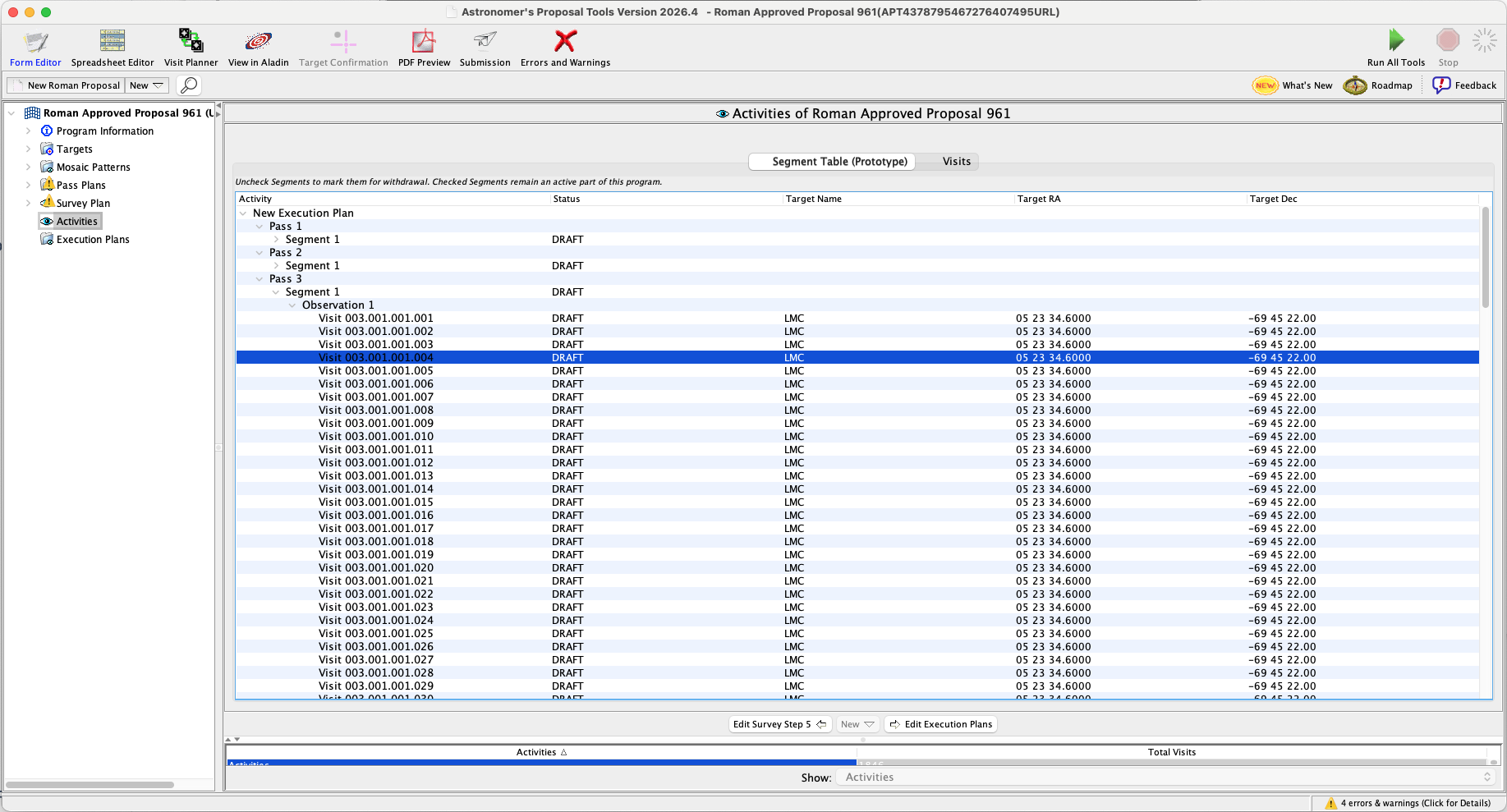
The Activities form shows all the activities (Passes, Segments, Observations, and Visits) for the Survey Plan as currently specified.
Status
Displays the status of Segments and Visits for approved programs (see Table of Activity Status below).
Table of Activity Status
| Segment | Visit | Notes |
| DRAFT | DRAFT | The segment is awaiting input from the observers. Segments with this status can be incorporated into a mission plan. |
| IMPLEMENTATION | IMPLEMENTATION | STScI operations staff are preparing the segment for flight. Segments with this status can be incorporated into a mission plan. |
| SCHEDULABLE | SCHEDULABLE | STScI operations staff have verified that this segment (and therefore the visits within the segment) are schedulable within its planning windows. |
| RESERVED | RESERVED | STScI operations staff have reserved this segment's visits for scheduling. |
| FLIGHT_READY | FLIGHT_READY | This segment's visits have been prepared for flight. The visit is ready to be added to the flight baseline. A flight baseline is the sequence of scheduled visits flown or to be flown on the spacecraft. |
| SCHEDULED | SCHEDULED | This segment's visits have been scheduled on the flight baseline. The visit has been scheduled on the flight baseline. |
| COMPLETED | COMPLETED | This segment's visits executed onboard Roman. The visit executed (at least partially) on board Roman. |
| FAILED | FAILED | As the result of an investigation initiated by a Roman Observation Problem Report (ROPR), STScI has determined that this segment or visit failed (at least partially). |
| SKIPPED | SKIPPED | This segment's visits were skipped onboard Roman. The visit was skipped on board Roman |
| PROBLEM | -- | At least one visit was SKIPPED in this segment and no visits remain at SCHEDULED status. |
| WITHDRAWN | WITHDRAWN | This segment has been removed from planning and scheduling and will not be executed. The visit has been removed from planning and scheduling and will not be executed. |
| UNRECOGNIZED | UNRECOGNIZED | Status value is not recognized by APT. |
Target Name
Name of the target for the activity.
Target RA
Right Ascension of the target, or of the segment of a region target.
Target Dec
Declination of the target, or of the segment of a region target.
For additional questions not answered in this article, please contact the Roman Help Desk.